耗时半天,我用 Kotlin 实现了 helang 何语言
起因
事情是这样的:一天下午,我偶然看到了这个仓库:
kifuan/helang: 何语言,次世代赛博编程语言。 (github.com)
有人用 Python 写了一套解释器,可以运行何同学同款代码:
u8 forceCon = [68];
forceCon[1 | 2 | 6 | 7 | 11 | 52 | 57 | 58 | 65] = 10;
print forceCon;
更不可思议的是,你甚至可以用他来测试 5G 速度,简直是太快啦:
test5g;
玩笑过后我转念一想,其实这样的功能,我完全可以用 Kotlin 脚本实现出来啊!说干就干,我立马建了个项目,花了一个下午,把东西搓出来了:
shaokeyibb/HeLangKotlinScriptImpl: 次世代赛博编程语言何语言现已兼容 JVM 平台! (github.com)
(不要脸的要个 Star 哈)
他可以写出来什么样的代码呢?对标上面 helang 代码的等效 HeLangKotlinScriptImpl 代码是:
val forceCon: u8 = createU8(68)
forceCon[1 `|` 2 `|` 6 `|` 7 `|` 11 `|` 52 `|` 57 `|` 58 `|` 65] = 10
println(forceCon)

test5g()
看起来还是有模有样地是吧,但是,这是如何实现的呢,并且相信已经有人发现了,很多地方和原版 helang 是不同的,这些不同又是怎么出现的呢?
原理
事实上,Kotlin 早已内置脚本支持,被称作 Kotlin Script,通过 Kotlin Script,我们可以快速的建立自己的 DSL 脚本,很棒是不是?
虽然这项功能仍是实验性质的,但是这并不妨碍我们在 Kotlin 上正常使用,事实上,Kotlin 文档中的这篇文章就详细介绍了如何自定义你自己的 Kotlin Script。
创建 Kotlin Script 解析器
要想创建一个自己的 Kotlin Script,我们首先需要引入指定的依赖,在 Gradle Kotlin DSL 中引入:
dependencies {
    implementation("org.jetbrains.kotlin:kotlin-scripting-common")
    implementation("org.jetbrains.kotlin:kotlin-scripting-jvm")
    // for eval script files directly
    implementation("org.jetbrains.kotlin:kotlin-scripting-jvm-host")
}
当然,前提是你已经正确引入了 Kotlin,就像这样:
plugins {
    kotlin("jvm") version "1.7.10"
}
接下来,我们需要创建脚本编译配置文件:
object HeLangKotlinScriptConfiguration : ScriptCompilationConfiguration({
    defaultImports(
        "io.hikarilan.helangkotlinscriptimpl.createU8",
        "io.hikarilan.helangkotlinscriptimpl.u8",
        "io.hikarilan.helangkotlinscriptimpl.|",
        "io.hikarilan.helangkotlinscriptimpl.test5g",
        "io.hikarilan.helangkotlinscriptimpl.sprint",
        "io.hikarilan.helangkotlinscriptimpl.cyberspaces",
    )
})
继承 ScriptCompilationConfiguration,并在其构造函数(一个 Builder)中进行配置,在这里,我们设置了 defaultImports,这意味着在编译时,这些指定的内容会被自动 import,就像 kotlin.* 和 java.lang.* 一样。当然,你还可以在这里添加其他配置,例如importScripts,compilerOptions等。
然后,我们需要创建一个 abstract class(或是 open class)作为这一类脚本的基类:
@KotlinScript(
    displayName = "He Lang Kotlin Script Implementation",
    fileExtension = "he.kts",
    compilationConfiguration = HeLangKotlinScriptConfiguration::class
)
abstract class HeLangKotlinScript
并使用 @KotlinScript 注解将其标识为一个 Kotlin 脚本基类。在这里,我们为我们的 HeLangKotlinScript 配置了 displayName 和 fileExtension,并指定了 compilationConfiguration 为上面创建的那个。
额外提一句,displayName 和 fileExtension 这些配置其实也可以在 ScriptCompilationConfiguration 中进行配置。
相信你已经发现了,在上面的 HeLangKotlinScriptConfiguration 上,我们加入了很多 defaultImports,实际上,这些 defaultImports 共同构成了 helang 的实现。
实现 helang
首先,我们需要实现一个 u8 。事实上, u8 就是一个 Wrapper,这个 Wrapper 包装了一个 MutableList,并且重载了很多运算符,就像这样:
class u8 private constructor(val list: MutableList<Int> = mutableListOf()) {

    constructor(size: Int) : this(list = MutableList(size) { 0 })

    operator fun set(index: Int, value: Int) {
        if (index == 0) {
            repeat(list.size) { list[it] = value }
            return
        }
        list[index - 1] = value
    }

    operator fun set(index: u8, value: Int) {
        index.list.forEach { this[it] = value }
    }

    operator fun get(index: Int): Int {
        return this.list[index - 1]
    }

    operator fun get(index: u8): u8 {
        return createU8(0).apply { index.list.forEach { list.add(this@u8[it]) } }
    }

    operator fun inc(): u8 {
        return this + 1
    }

    operator fun dec(): u8 {
        return this - 1
    }

    operator fun plus(i: Int): u8 {
        return u8(this.list.map { it + i }.toMutableList())
    }

    operator fun minus(i: Int): u8 {
        return u8(this.list.map { it - i }.toMutableList())
    }

    override fun toString(): String {
        return list.toString()
    }

    override fun hashCode(): Int {
        return list.hashCode()
    }

    override fun equals(other: Any?): Boolean {
        return list == other
    }

}
这部分代码使得以下特性得以实现:
- 数组的下标从
1开始 当使用
0作为下标时,u8中的所有元素都将被赋值多下标操作
在早期版本,我尝试直接使用一个 typealias(这很像 C++ 的 define)将 u8 直接定义为一个 MutableList<Int>,但这样做会导致很多操作符无法被正确的重载,因此变成了现在的样子。
接下来,我们需要一个方式创建 u8,由此,我创建了 createU8 函数:
fun createU8(size: Int): u8 = u8(size)
为什么不直接使用 [68] 的方式创建呢,因为 Kotlin 并不支持通过 [element] 的方式创建一个常规数组 —— 事实上,编译器会告诉你这种创建方式只能适用于注解参数中。
接下来是最重要的一部分,我们需要使用 | 字符来创建 u8,这里,我们用到了 infix function:
infix fun Int.`|`(other: Int): u8 = u8(0).apply {
    this.list.add(this@`|`)
    this.list.add(other)
}

infix fun u8.`|`(other: Int): u8 = this.apply { list.add(other) }
infix function 指中缀函数,这允许我们通过一种特殊的表达方式来近似的模拟操作符的使用模式,而实际上:
1 `|` 2
等价于:
1.`|`(2)
通过这种方式,我们可以使用 | 字符优雅的创建 u8。
但是你可能注意到了,我们必须使用反引号将 | 括起来才可以正常使用,这是因为对于非标准字符(这也包括中文)作为函数名时,必须这么做。
那么可能会有人问了,为什么不直接重载按位或运算符呢?事实上,Kotlin 并未使用 | 作为按位或运算符,取而代之的时 infix function or:
/** Performs a bitwise OR operation between the two values. */
public infix fun or(other: Int): Int
最后需要注意的一点是,上面的所有函数全部为顶层函数(Top Level Function),这可以方便脚本直接调用这些函数,而不需要指定命名空间。
搞到这里,其实我们的 HeLangKotlinScriptImpl 已经接近完成了,但是,为了方便使用,我决定制作一个 hoster,允许直接通过 jar 执行我们的脚本。
Hoster
首先,确保你已经引入了 org.jetbrains.kotlin:kotlin-scripting-jvm-host 依赖,并且指定了 Main 方法的位置。在 Gradle Kotlin DSL 中:
val jar by tasks.getting(Jar::class) {
    manifest {
        attributes["Main-Class"] = "io.hikarilan.helangkotlinscriptimpl.HeLangKotlinScriptImplKt"
    }
}
来托管 MANIFEST.MF 文件中的 Main-Class 键值对。
这里需要注意的一点是,如果你的 Kotlin 主类是 HeLangKotlinScriptImpl.kt,那么实际的主类名应当为 HeLangKotlinScriptImplKt
接下来,在主类创建顶层函数 main,编写代码:
fun main(vararg args: String) {
    if (args.isEmpty()) {
        println("usage: <app> <he lang script file>")
        return
    }

    evalFile(File(args[0]))
}
很简单是不是,如此一来,我们便可以通过传入参数来指定脚本文件并执行了。
最终效果
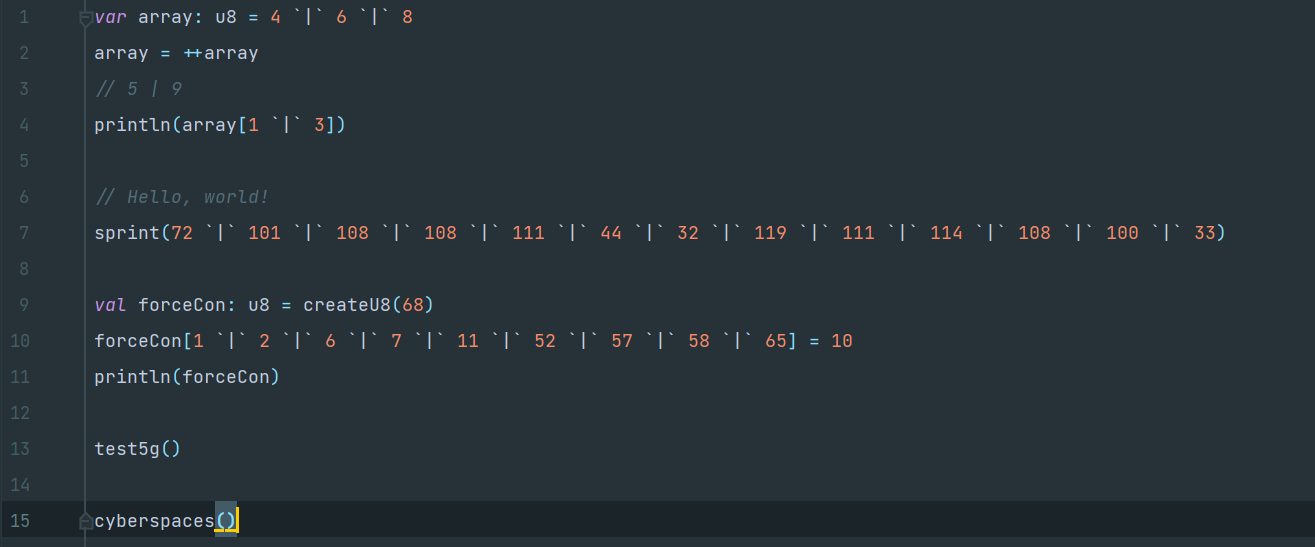
In hello.he.kts:
var array: u8 = 4 `|` 6 `|` 8
array = ++array
// 5 | 9
println(array[1 `|` 3])

// Hello, world!
sprint(72 `|` 101 `|` 108 `|` 108 `|` 111 `|` 44 `|` 32 `|` 119 `|` 111 `|` 114 `|` 108 `|` 100 `|` 33)

val forceCon: u8 = createU8(68)
forceCon[1 `|` 2 `|` 6 `|` 7 `|` 11 `|` 52 `|` 57 `|` 58 `|` 65] = 10
println(forceCon)

test5g()

cyberspaces()
PowerShell:
PS D:\ProgramData\IdeaProjects\HeLangKotlinScriptImpl> java -jar .\build\libs\HeLangKotlinScriptImpl-1.0-SNAPSHOT-all.jar hello.he.kts
[5, 9]
Hello, world!
[10, 10, 0, 0, 0, 10, 10, 0, 0, 0, 10, 0, 0, 0, 0, 0, 0, 0, 0, 0, 0, 0, 0, 0, 0, 0, 0, 0, 0, 0, 0, 0, 0, 0, 0, 0, 0, 0, 0, 0, 0, 0, 0, 0, 0, 0, 0, 0, 0, 0, 0, 10, 0, 0, 0, 0, 10, 10, 0, 0, 0, 0, 0, 0, 10, 0, 0, 0]
> Cyber DJ is downloading musics via 5G...
Downloading Kill You.mp3, totally 14 MB
| Successfully downloaded Kill You.mp3
Downloading Mockingbird.mp3, totally 25 MB
| Successfully downloaded Mockingbird.mp3
Downloading Space Bound.flac, totally 15 MB
| Successfully downloaded Space Bound.flac
Downloading Phenomenal.mp3, totally 22 MB
| Successfully downloaded Phenomenal.mp3
Downloading Rap God.flac, totally 22 MB
| Successfully downloaded Rap God.flac
Downloading Lose Yourself.ogg, totally 19 MB
| Successfully downloaded Lose Yourself.ogg
Downloading ZOOD.ogg, totally 29 MB
| Successfully downloaded ZOOD.ogg
Downloading Kinds Never Die.flac, totally 24 MB
| Successfully downloaded Kinds Never Die.flac
Downloading Stan.ogg, totally 18 MB
| Successfully downloaded Stan.ogg
Downloading The Monster.mp3, totally 25 MB
| Successfully downloaded The Monster.mp3
Downloading Guts Over Fear.ogg, totally 16 MB
| Successfully downloaded Guts Over Fear.ogg
Downloading I Need a Doctor.flac, totally 19 MB
| Successfully downloaded I Need a Doctor.flac
Downloading Lighters.ogg, totally 27 MB
| Successfully downloaded Lighters.ogg
Downloading Beautiful.flac, totally 16 MB
| Successfully downloaded Beautiful.flac
Downloading Love the Way You Lie.mp3, totally 25 MB
| Successfully downloaded Love the Way You Lie.mp3
Downloading Stan.flac, totally 10 MB
| Successfully downloaded Stan.flac
Downloading Not Afraid.ogg, totally 16 MB
| Successfully downloaded Not Afraid.ogg
Downloading Numb Encore.flac, totally 27 MB
| Successfully downloaded Numb Encore.flac
> Test finished, 5G is so fast!
Getting your location...
Your location is CHINA.
What a pity! It seems that you are not in the Cyber Spaces.
总结
本文通过使用 Kotlin Script 创建了一套新的 DSL,并允许自定义脚本运行。




太酷了不是吗
????????????????????????????????????????????????????????????
感觉。。。比jvav好,不如。。。迷你世界