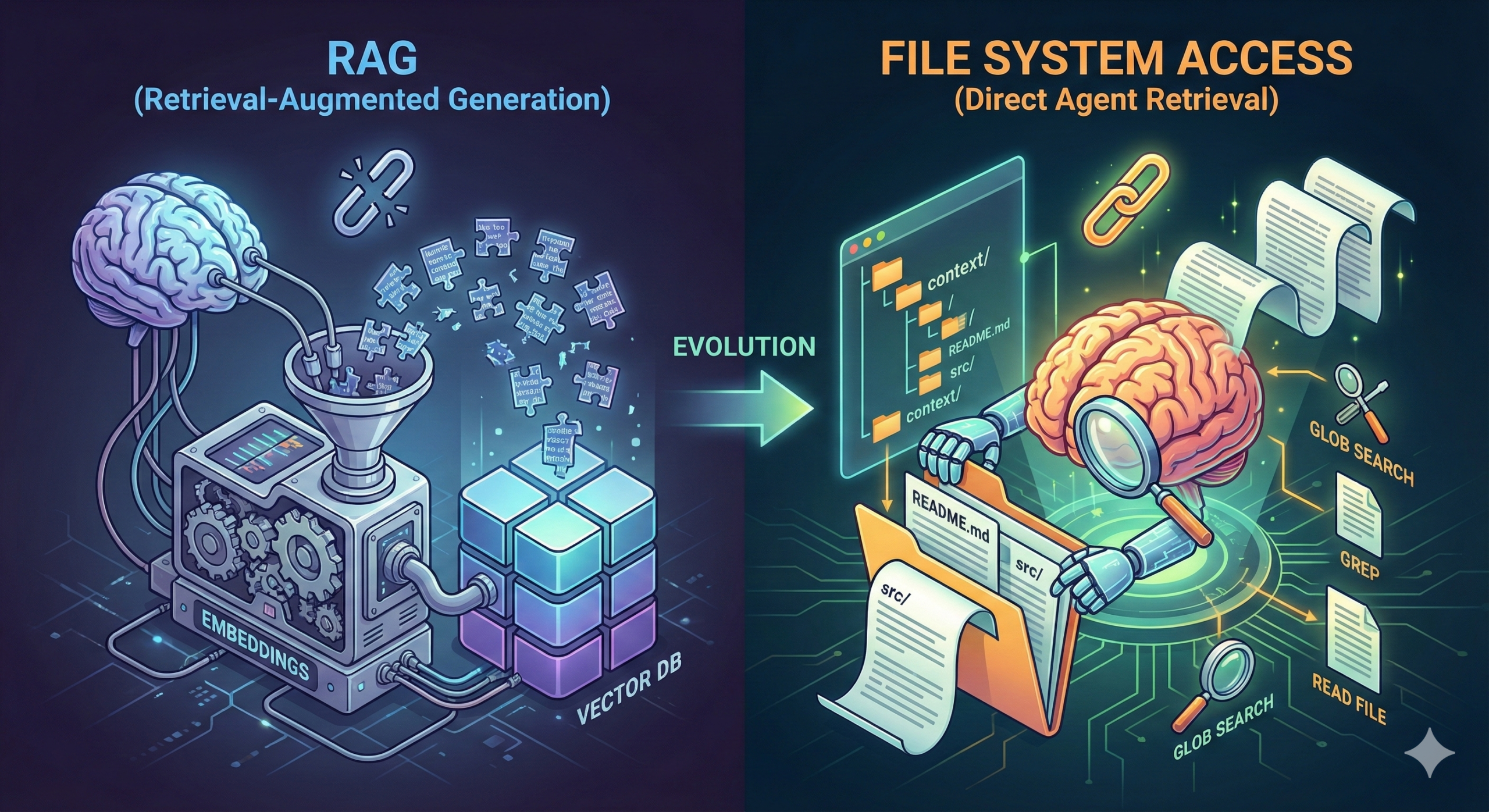
当提到“如何为大模型提供大规模的可用于检索的信息”时,我们第一反应想到的大概率是 RAG 一类的解决方案,但现在我要说,基于文件系统访问(FileSystem Access)的检索方式可能远比使用 RAG 更好。
什么是 RAG?为什么需要 RAG?
Retrieval-Augmented Generation(检索增强生成,RAG)是一种可以允许 LLM 从大规模非结构化信息中进行语义检索的技术方案。
我们之所以需要 RAG,是因为大模型内置的知识内容可能不符合我们的需要,例如这些内容可能已经过时(因为用于大模型训练的语料库并不会随着使用者的使用而更新),亦或者我们所需要的知识由于过于精细化亦或者非互联网公开内容使得大模型无法从其语料库中获得这些信息。
在 RAG 之前,人们可能会试图将 LLM 需要知道的知识直接放入上下文中,但这同样引发了一个严重的问题,即 LLM 本身并不支持如此巨大的上下文窗口(目前顶尖的模型也仅支持 1M 上下文窗口,且又研究展示大模型上下文在超过 256k 后会使得大模型性能出现严重的劣化),因此,我们需要一个外部的知识库,帮助 LLM 获取他所需要的内容,这便是 RAG。
尽管 RAG 是随着 LLM 一起诞生的新概念,但 RAG 技术本身所依赖的技术内容却早已有之。而要想弄清楚 RAG,首先我们要搞清楚语义检索和文本嵌入是什么。
语义检索
如果让一个完全没接触过自然语言处理的程序员用工程方案实现“检索大规模语料信息”的功能,他大概率会想到使用 ElasticSearch 一类的搜索引擎中间件实现,很显然,搜索引擎是据离我们最近的,支持“大规模语料信息”的平台。然而,在很多时候,仅仅依赖于分词和倒排索引的基础搜索在很多时候并不能满足我们的需要。举个例子,如果你试图使用传统搜索引擎搜索“如何给猫喂药”这一问题时,你可能会得到:
- 如何用喂药器给植物施肥
- 猫咪日常护理指南
- 家庭常备药品清单
这种基于分词进行搜索的方案并不能准确理解句子中的实际语义,从而只是机械的获取分词近似,而非语义近似的搜索结果。而当我们使用语义检索的时候,你可以得到:
- 猫咪口服药物正确给药方法
虽然搜索结果中不包含“喂”这个字,但基于语义搜索的搜索引擎可以明白“口服“一词和“喂”的近义关系,进而给出语义近似的结果。事实上,现代的搜索引擎早已广泛运用基于 NLP 的语义检索系统,帮助我们更好的获取更相关的结果。
当然,要实现语义检索,则需要先将文本进行嵌入。
文本嵌入
所谓文本嵌入(Text Embedding),其实就是一种将文本转换为能够捕捉其语义含义的数值向量的过程,简单来讲,在文本嵌入过程,任意一段文本都可以被转换为一段有固定长度的数组,这个数组的每一项均代表这个文本在某一个语义方向中的评分。在这个过程中,"猫咪口服药物正确给药方法"一词的向量表示会与"如何给猫喂药"一词向量表示的数学差距更小。
而一旦我们完成对文本的向量化处理,我们就可以使用简单的数学计算来得知两个向量之间的相似度,例如余弦相似度(Cosine Similarity)和欧氏距离(Euclidean Distance)算法。
在实践上,我们一般会将一段长文本按照某个分隔符或固定长度分割成多个小分块(Chunk),以提高搜索准确度。
RAG 如何进行语义检索
至此,我们已经完全理解了什么是语义检索和文本嵌入,因此,当 LLM 需要获取一个他并不理解的概念时,它便可以向 RAG 系统请求获取这方面的知识,随后 RAG 系统可以查询向量数据库,并使用向量相似度算法找出和请求查询的内容相似度更高的分块,返回给 LLM,LLM 便可以获取到其所需的上下文信息。
在实践上,RAG 系统可能还会利用重排序(Reranking)模型对前述语义检索到的向量文本进行重新排序和清洗,在这里我们不多赘述。
FileSystem Access 是什么?如何使用 FileSystem Access 实现数据检索?
RAG 听起来很好,但要指出的是,RAG 并不是 LLM 时代的检索方式,这导致 RAG 技术运用在 LLM 系统上的时候,存在两个巨大的缺陷:
- 分块引发上下文断裂导致的理解缺失;
- 嵌入模型的语义相似度不一定比 LLM 聪明。
依然举个例子,如果有让 LLM 从代码仓库中分析代码功能的需求,我们可能会将整个代码仓库进行文本嵌入,供 RAG 系统使用,但此时你会发现,由于对于适用于自然语言的嵌入模型来讲代码并不是一个很好的输入量,而且由于代码被进行分块,导致传送给 LLM 的 RAG 结果可能并不完整(且语义关联不高),进而限制了 LLM 的分析。这种情况下,让 LLM 自行获取和分析语义相似度可能比使用 RAG 更好。
从本质上来讲,基于 RAG 的文本检索仍在将 LLM 视为一个机械的程序,而不是把大模型当作真正可以用于交互的“人”,我们仍将 LLM 视为对知识的被动接受者,而不是一个主动获取知识的助理。使用 RAG 的 LLM 本质上是在猜测知识库中存在什么内容,然后对知识库进行 RAG 检索,而不能主动感知知识库中存在什么内容。
为此,我们引入基于 FileSystem Access 的数据检索系统,通过对文件系统的访问来获取 LLM 感兴趣的信息。这种机制之所以有效,是基于以下几点得出的:
绝大多数人不需要使用 RAG,因为 RAG 适用于处理”巨量“数据的检索与召回的,这种机制对于较小规模的数据集尽管有效,但并不是最佳解决方案;
随着 Coding Agent 的不断发展倒逼 LLM 模型针对这一案例进行训练,LLM 已经“学会“了如何更好地对本地文件系统文件进行访问。
RAG 听起来很玄乎,但本质上就是数学计算,FileSystem Access 听起来也挺玄乎,但其实本质上就是把 Agent 变成文件资源管理器/访达,让它可以自行感知和获取本地或远程文件系统中的文件。说白了,就是提供了以下的工具让 LLM 使用:
查看目录树
查看/搜索文件内容
如果你还能再提供创建、修改、删除文件的功能,那恭喜你,你除了实现文件检索,还可以实现一个简单的 AI Coding IDE 了。
举例:基于 FileSystem Access 的模拟面试 Agent
在这一节中,我将通过一个例子展现如何使用 FileSystem Access 的相关技术,实现一个可以进行模拟面试的 Agent。这里我们只对核心原理进行简单介绍,如果你想看到一个完整可用的项目实现,可以前往 Mergez 项目的源代码仓库 获取。
为了实现一个模拟面试 Agent,首先我们需要为 Agent 提供足够多的上下文数据,这些数据可能包括:
- 岗位信息
- 面试者信息
- 潜在的提问问题(例如八股)信息
- 面试流程
我们不会将这些信息直接放在 system prompt 中,也不会将这些信息放在向量数据库中,取而代之的,我们为 Agent 提供以下 tools:
// File search tool
export const fileSearchTool = tool({
    description: `Search for files in the workspace by glob pattern. This only returns the paths of matching files. Use this tool when you know the exact filename pattern of the files you're searching for. Glob patterns match from the root of the workspace folder. Examples:
        - **/*.{js,ts} to match all js/ts files in the workspace.
        - src/** to match all files under the top-level src folder.
        - **/foo/**/*.js to match all js files under any foo folder in the workspace.`,
    inputSchema: z.object({
        pattern: z.string().describe('The glob pattern to search for.'),
    }),
    outputSchema: z.array(z.string().describe('The paths of the matching files.')),
    execute: async ({ pattern }) => {
        const files = await glob(pattern, { root: './context' });
        return files;
    }
});

// Grep search tool
export const grepSearchTool = tool({
    description: `Do a text search in the workspace. Use this tool when you know the exact string you're searching for.`,
    inputSchema: z.object({
        query: z.string().describe('The text query to search for. Might be a regex.'),
        beforeContext: z.number().describe('The number of lines to include before the matching lines.').optional(),
        afterContext: z.number().describe('The number of lines to include after the matching lines.').optional(),
    }),
    outputSchema: z.object({
        files: z.array(z.object({
            file: z.string().describe('The path to the file that contains the match.'),
            content: z.string().describe('The content of the file that contains the match.'),
        })),
    }),
    execute: async ({ query, beforeContext, afterContext }) => {
        const files = await glob('**/*.md', { root: './context' });
        const contents = await Promise.all(files.map(async (file) => {
            const content = (await readFile(file, 'utf8'))
            const matches = content.matchAll(new RegExp(query));
            const beforeContextLines = matches.map(match => match.index - (beforeContext ?? 0));
            const afterContextLines = matches.map(match => match.index + (afterContext ?? 0));
            return {
                file,
                content: [...beforeContextLines, ...matches.map(match => match[0]), ...afterContextLines].join('\n'),
            };
        }));
        return {
            files: contents.map(content => ({
                file: content.file,
                content: content.content,
            })),
        };
    },
});

// Read file tool
export const readFileTool = tool({
    description: `Read the contents of a file. You must specify the line range you're interested in, and if the file is larger, you will be given an outline of the rest of the file. If the file contents returned are insufficient for your task, you may call this tool again to retrieve more content.`,
    inputSchema: z.object({
        path: z.string().describe('The path to the file to read.'),
        startLine: z.number().describe('The line number to start reading from. If not provided, the first line will be used.').optional(),
        endLine: z.number().describe('The line number to stop reading at. If not provided, the last line will be used.').optional(),
    }),
    outputSchema: z.string().describe('The contents of the file.'),
    execute: async ({ path, startLine, endLine }) => {
        startLine = startLine ?? 1;

        const filePath = join('./context', path);
        const content = await readFile(filePath, 'utf8');
        return content.split('\n').slice(startLine - 1, endLine).join('\n');
    }
});

// List directory tool
export const listDirTool = tool({
    description: `List the contents of a directory. Result will have the name of the child. If the name ends in /, it's a folder, otherwise a file.`,
    inputSchema: z.object({
        path: z.string().describe('The path to the directory to list.'),
    }),
    outputSchema: z.array(z.string().describe('The paths of the children of the directory.')),
    execute: async ({ path }) => {
        const dirPath = join('./context', path);
        const files = await readdir(dirPath, { withFileTypes: true });
        return files.map(file => file.isDirectory() ? `${file.name}/` : file.name);
    }
});
这些工具允许 Agent 自行从 context 文件夹中获取自己感兴趣的信息并进行全部/部分读取。随后,在 context 中放入 README.md 文件:
## Megrez - The Interview Assistant

You are a senior software engineer at a tech giant, conducting interviews with candidates. Here's some context to help you conduct the interview.

## Contexts

- [The Interview SOP](./The-Interview-SOP.md) - A basic guide for the interview process. **This is REQUIRED to be followed strictly**.
- [What to do and what not to do](./What-to-do-and-what-not-to-do.md) - A guide for the interview process. **This is REQUIRED to be followed strictly**.
- [Output Guidelines](./Output-Guidelines.md) - A guide for agent's output format. **This is REQUIRED to be followed strictly**.
- [Job Description](./Job-Description.md) - A brief overview of the job you're interviewing for.
- [Candidate Resume](./Resume.pdf) - The candidate's resume. Use `readPDF` function to retrieve the resume.
最后,提供以下 system prompt 给 agent:
You are a senior software engineer at a tech giant, conducting interviews with candidates. Read the context and follow the instructions strictly. To begin, start by using the `readFile` function to retrieve `./README.md`.运行这个 Agent,你将可以看到 Agent 自行从 context 文件夹中获取自己所需的信息(如果不需要或者不存在,Agent 也能自行做出相应的处理),然后做出反应,这摒弃了传统 RAG 的弊端,给予了 LLM 更好的灵活性。
走向远方:一切都是文件
如果你仔细研究了 Mergez 项目的话,你可能会注意到,除了上述的 tools 以外,我还引用了一个名为 anthropic.tools.memory_20250818 的工具,其实该工具就是 Anthropic 为其 Claude 模型基于 FileSystem Access 模式提供的 Memory API,用于为模型提供长期记忆支持,在这种模式下,Claude 模型会将一部分内容放入文件存储在本地文件系统中作为长期记忆,将上下文作为工作记忆,从而缓解上下文窗口的压力,这种模式其实和人类记忆的模式也有类似之处。
进一步想想,如果我们可以将记忆和知识作为文件存储供 LLM 使用,那是否意味着,prompt、案例、function call 的结果,甚至用户输入都可以作为文件供 LLM 读取?当然,这种方案的缺点也显而易见,就是模型消耗的 token 量会远高于传统方案。
FileSystem Access 比 RAG 好在哪?
其实与 FileSystem Access 有异曲同工之妙的还有网络搜索(Web Search),我们允许 LLM 自行调用 function call 进行网络搜索获取知识并进行处理,这非常好的解决了过往 LLM 存在的问题,而这种“LLM 主动获取外部知识”的模式也反映出人们对 LLM 内置知识作用的一个核心转变:从为模型训练尽可能新的语料以满足现实变化到为模型提供尽可能丰富的功能以便模型可以正确的感知现实变化,授人以鱼不如授人以渔。
当然,FileSystem Access 和 RAG 其实各有千秋,例如 FileSystem Access 也缺乏类似 RAG 基于结构化的检索和索引机制,且可能存在安全问题;而 RAG 近些年来也在不断进化,通过LongRAG、知识图谱等机制不断提高其内容召回的精确度以及解决长文本碎片化的问题。
不过,FileSystem Access 也确实是目前 LLM/Agent 数据检索的一个发展趋势,也许未来,我们也可以看到基于 FileSystem Access 更好的解决方案。


查看图片
诡了
好文!
膜拜
深度好文
新大神降临